
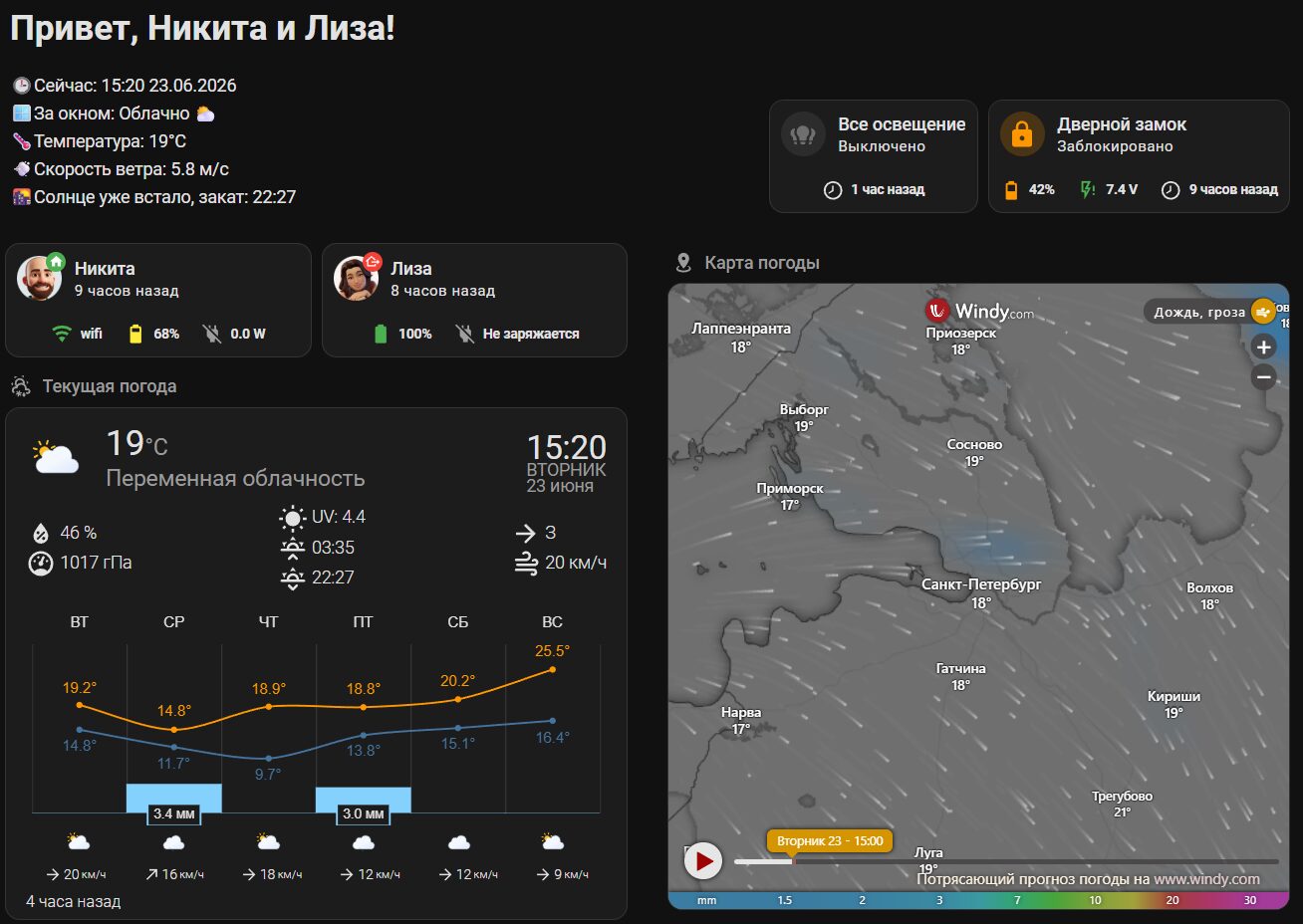
Это пример моей заглавной страницы, где я вывожу сводку погоды, статус пользователей и их телефонов, а так же основных элементов управления – освещения и дверного замка.
Обо всем по порядку.
Используется стандартный макет HA – Разделы.


Для снятия сенсоров погоды используется 2 интеграции, но можно использовать любую. Мой выбор продиктован: Яндекс точнее сообщает о температуре и скорости ветра, openweathermap дает больше статусов (облачно, переменная облачность, дождь и т.д.).
– https://www.home-assistant.io/integrations/openweathermap/
– https://github.com/IATkachenko/HA-YandexWeather
Код, вставляется прямо в карточку:
					# Привет, Никита и Лиза!
🕒Сейчас: {{ now().strftime("%H:%M %d.%m.%Y") }}
🪟За окном:
{%- set current_raw = states('sensor.openweathermap_weather_code') %}
{%- if current_raw is not none and current_raw != 'unavailable' and current_raw|length > 0 %}
  {%- set current = current_raw|int %}
  {%- set conditions = {
    'Туман \U0001F32B': [701, 741],
    'Гроза \U0001F329': [210, 211, 212, 221],
    'Дождь/Гроза \U000026C8': [200, 201, 202, 230, 231, 232],
    'Облачно \U000026C5': [801, 802, 803, 804],
    'Дождь \U00002614': [504, 314, 502, 503, 522, 300, 301, 302, 310, 311, 312, 313, 500, 501, 520, 521, 906],
    'Снег \U00002744': [600, 601, 602, 611, 612, 620, 621, 622],
    'Снег с дождём \U00002614\U00002744': [511, 615, 616],
    'Ясно \U00002600': [800],
    'Ветер \U0001F4A8': [905, 951, 952, 953, 954, 955, 956, 957, 958, 959, 960, 961],
    'Внимание \U000026A0': [711, 721, 731, 751, 761, 762, 771, 900, 901, 962, 903, 904]
  } %}
  {%- for condition, value in conditions.items() %}
    {%- if current in value %}
      {{- " " + condition}}
    {%- endif %}
  {%- endfor %}
{%- else %}
  Не удалось получить данные о погоде
{%- endif %}
🌡️Температура: {{states.sensor.yandex_weather_temperature.state}}°C
💨Скорость ветра: {{states.sensor.yandex_weather_wind_speed.state}} м/с{% if now().strftime("%H:%M") < as_timestamp(states.sun.sun.attributes.next_rising) | timestamp_custom("%H:%M") %}
  🌅Солнце уже село, восход: {{ as_timestamp(states.sun.sun.attributes.next_rising) | timestamp_custom("%H:%M") }}
{% else %}
  🌇Солнце уже встало, закат: {{ as_timestamp(states.sun.sun.attributes.next_setting) | timestamp_custom("%H:%M") }}
{% endif %}

Карточка показывает:
Для отслеживания пользователей используется интеграция для роутеров Keenetic https://www.home-assistant.io/integrations/keenetic_ndms2. Она позволяет отслеживать подключение телефонов к домашней сети и тем самым поднимать статус: Дома/Не дома. Так же можно опредять статус подключения телефонов и обычным пингом другими интеграциями, а так же геолокацией от штатного приложения HA на телефоне.
Для снятия статусов подключения к сети, заряда батареи используется сенсоры штатного приложения HA для телефонов.
Код:
					type: horizontal-stack
cards:
  - type: custom:vertical-stack-in-card
    cards:
      - type: custom:mushroom-person-card
        entity: person.nikita
        icon_type: entity-picture
        secondary_info: last-changed
        card_mod:
          style: |
            ha-card {
              background: transparent;
            }
      - type: horizontal-stack
        cards:
          - type: custom:mushroom-chips-card
            alignment: center
            card_mod:
              style: |
                ha-card {
                    --chip-font-size: 0.3em;
                    --chip-icon-size: 0.5em;
                    --chip-border-width: 0;
                    --chip-box-shadow: none;
                    --chip-background: none;
                    --chip-border: none;
                    --chip-spacing: none;
                    --chip-font-weight: bold;
                }
            chips:
              - type: template
                entity: sensor.realme_p3u_network_type
                content: "{{ states('sensor.realme_p3u_network_type')}}"
                icon: >-
                  {% if is_state('sensor.realme_p3u_network_type','wifi')%}
                    mdi:wifi
                  {% elif is_state('sensor.realme_p3u_network_type','vpn')%}
                    mdi:network
                  {% elif
                  is_state('sensor.realme_p3u_network_type','cellular')%}
                    mdi:signal-4g
                  {% else %}
                    mdi:network-strength-off
                  {% endif %}
                icon_color: >-
                  {% if is_state('sensor.realme_p3u_network_type','wifi') or
                  is_state('sensor.realme_p3u_network_type','vpn')%}
                    green
                  {% elif
                  is_state('sensor.realme_p3u_network_type','cellular')%}
                    red
                  {% else %}
                    grey
                  {% endif %}
                tap_action:
                  action: more-info
              - type: template
                entity: sensor.realme_p3u_battery_level
                content: "{{ states('sensor.realme_p3u_battery_level')}}%"
                icon: >-
                  {% set state = states('sensor.realme_p3u_battery_level')|float
                  %}

                  {% if state >= 0 and state < 10 %} mdi:battery-10

                  {% elif state >= 10 and state < 20 %} mdi:battery-20

                  {% elif state >= 20 and state < 30 %} mdi:battery-30

                  {% elif state >= 30 and state < 40 %} mdi:battery-40

                  {% elif state >= 40 and state < 50 %} mdi:battery-50

                  {% elif state >= 50 and state < 60 %} mdi:battery-60

                  {% elif state >= 60 and state < 70 %} mdi:battery-70

                  {% elif state >= 70 and state < 80 %} mdi:battery-80

                  {% elif state >= 80 and state < 95 %} mdi:battery-90

                  {% else %} mdi:battery

                  {% endif %}
                icon_color: >-
                  {% set state = states('sensor.realme_p3u_battery_level')|float
                  %}

                  {% if state >= 0 and state < 20 %} red

                  {% elif state >= 20 and state < 50 %} orange

                  {% elif state >= 50 and state < 80 %} yellow

                  {% else %} green

                  {% endif %}
                tap_action:
                  action: more-info
              - type: template
                entity: sensor.realme_p3u_battery_power
                content: "{{ states('sensor.realme_p3u_battery_power')}} W"
                icon: |-
                  {% if is_state('binary_sensor.realme_p3u_is_charging','on')%}
                    mdi:power-plug
                  {% else %}
                    mdi:power-plug-off
                  {% endif %}
                icon_color: |-
                  {% if is_state('binary_sensor.realme_p3u_is_charging','on')%}
                    blue
                  {% else %}
                    grey
                  {% endif %}
                tap_action:
                  action: more-info
  - type: custom:vertical-stack-in-card
    cards:
      - type: custom:mushroom-person-card
        entity: person.liza
        icon_type: entity-picture
        secondary_info: last-changed
        card_mod:
          style: |
            ha-card {
              background: transparent;
            }
      - type: horizontal-stack
        cards:
          - type: custom:mushroom-chips-card
            alignment: center
            card_mod:
              style: |
                ha-card {
                    --chip-font-size: 0.3em;
                    --chip-icon-size: 0.5em;
                    --chip-border-width: 0;
                    --chip-box-shadow: none;
                    --chip-background: none;
                    --chip-border: none;
                    --chip-spacing: none;
                    --chip-font-weight: bold;
                }
            chips:
              - type: template
                entity: sensor.iphone_elizaveta_battery_level
                content: "{{ states('sensor.iphone_elizaveta_battery_level')}}%"
                icon: >-
                  {% set state =
                  states('sensor.iphone_elizaveta_battery_level')|float %} {% if
                  state >= 0 and state < 10 %} mdi:battery-10 {% elif state >=
                  10 and state < 20 %} mdi:battery-20 {% elif state >= 20 and
                  state < 30 %} mdi:battery-30 {% elif state >= 30 and state <
                  40 %} mdi:battery-40 {% elif state >= 40 and state < 50 %}
                  mdi:battery-50 {% elif state >= 50 and state < 60 %}
                  mdi:battery-60 {% elif state >= 60 and state < 70 %}
                  mdi:battery-70 {% elif state >= 70 and state < 80 %}
                  mdi:battery-80 {% elif state >= 80 and state < 95 %}
                  mdi:battery-90 {% else %} mdi:battery {% endif %}
                icon_color: >-
                  {% set state =
                  states('sensor.iphone_elizaveta_battery_level')|float %} {% if
                  state >= 0 and state < 20 %} red {% elif state >= 20 and state
                  < 50 %} orange {% elif state >= 50 and state < 80 %} yellow {%
                  else %} green {% endif %}
                tap_action:
                  action: more-info
              - type: template
                entity: sensor.iphone_elizaveta_2_battery_state
                content: >-
                  {% if
                  is_state('sensor.iphone_elizaveta_2_battery_state','Charging')%}
                    Заряжается
                  {% else %}
                    Не заряжается
                  {% endif %}
                icon: >-
                  {% if
                  is_state('sensor.iphone_elizaveta_2_battery_state','Charging')%}
                    mdi:power-plug
                  {% else %}
                    mdi:power-plug-off
                  {% endif %}
                icon_color: >-
                  {% if
                  is_state('sensor.iphone_elizaveta_2_battery_state','Charging')%}
                    blue
                  {% else %}
                    grey
                  {% endif %}
                tap_action:
                  action: more-info

Контроль и выключение всего освещения используется когда уходишь из дома или готовишься ко сну.
Замок по аналогичной схеме, как наиболее важный элемент безопасности.
					type: custom:vertical-stack-in-card
cards:
  - type: custom:mushroom-entity-card
    entity: lock.aqara_smart_lock_u200
    fill_container: true
    secondary_info: state
    primary_info: name
    layout_options:
      grid_columns: 2
      grid_rows: 1
    tap_action:
      action: toggle
    name: Дверной замок
    icon_color: accent
  - type: horizontal-stack
    cards:
      - type: custom:mushroom-chips-card
        alignment: center
        chips:
          - type: template
            entity: sensor.aqara_smart_lock_u200_batareia
            content: "{{ states('sensor.aqara_smart_lock_u200_batareia')}}%"
            icon: >-
              {% set state =
              states('sensor.aqara_smart_lock_u200_batareia')|float %}

              {% if state >= 0 and state < 10 %} mdi:battery-10

              {% elif state >= 10 and state < 20 %} mdi:battery-20

              {% elif state >= 20 and state < 30 %} mdi:battery-30

              {% elif state >= 30 and state < 40 %} mdi:battery-40

              {% elif state >= 40 and state < 50 %} mdi:battery-50

              {% elif state >= 50 and state < 60 %} mdi:battery-60

              {% elif state >= 60 and state < 70 %} mdi:battery-70

              {% elif state >= 70 and state < 80 %} mdi:battery-80

              {% elif state >= 80 and state < 95 %} mdi:battery-90

              {% else %} mdi:battery

              {% endif %}
            icon_color: >-
              {% set state =
              states('sensor.aqara_smart_lock_u200_batareia')|float %}

              {% if state >= 0 and state < 20 %} red

              {% elif state >= 20 and state < 50 %} orange

              {% elif state >= 50 and state < 80 %} yellow

              {% else %} green

              {% endif %}
            tap_action:
              action: more-info
          - type: template
            entity: sensor.aqara_smart_lock_u200_battery_voltage
            content: "{{ states('sensor.aqara_smart_lock_u200_battery_voltage')}} V"
            icon: mdi:flash-alert-outline
            icon_color: >-
              {% set state =
              states('sensor.aqara_smart_lock_u200_battery_voltage')|float %}

              {% if state < 7.0 %} red

              {% elif state < 7.2 %} orange

              {% elif state < 7.3 %} yellow

              {% else %} green

              {% endif %}
            tap_action:
              action: more-info
          - type: entity
            entity: lock.aqara_smart_lock_u200
            icon: mdi:clock-time-eight-outline
            content_info: last-changed
            use_entity_picture: false
        card_mod:
          style: |
            ha-card {
                --chip-font-size: 0.3em;
                --chip-icon-size: 0.5em;
                --chip-border-width: 0;
                --chip-box-shadow: none;
                --chip-background: none;
                --chip-border: none;
                --chip-spacing: none;
                --chip-font-weight: bold;
            }

Все просто, используются две кастомные карточки с выбором источника погоды и настройкой отображения элементов под себя.

Используется штатная карточка “Веб-страница” с указанием ссылки на сайт в которой предварительно настроены элементы отображения.
Пример с Windy, URL адрес:
https://embed.windy.com/embed2.html?lat=59.889&lon=30.278&zoom=7&level=surface&overlay=rain&menu=&message=&marker=&calendar=&pressure=&type=map&location=coordinates&detail=&detailLat=59.898&detailLon=30.262&metricWind=m/s&metricTemp=°C&radarRange=-1" frameborder="0"></iframe>